Beyond Vibe Coding: Spec-Driven Development for AI Coding Projects
Part 1: The Dynamic V-Model
Introduction
In the past few years, LLM Code Generation has gone through rapid development. From a cool curiosity that was a more convenient autocomplete and a leetcode cheat tool, to a useful chat system that could copy and paste publicly available code, to something that can, if used properly, be used to build increasingly large software projects.
At the time of writing this article, a smorgasbord of new tools is already available, with new tools and models being released every day. No person could keep track of all of these tools and we are all experiencing fear of missing out (FOMO). At the same time this leaves all of us scratching our heads, asking ourselves; "What tools should we focus on?". In this article I attempt to organize my thoughts and experiences and try to cut through the noise and provide tools and principles that, in my experience with small to mid sized greenfield software projects, yield the best results.
Before I used these principles, I tried to "Vibe Code" several projects, all of these projects ended up as big hairy messes of code that the coding agent got stuck on. These are the typical vibe coding problems developers run into. Let's just say, I have never been so grateful for the ability to keep projects on GitHub private.
What I noticed was that each change cost progressively more time to make and each change had an increased risk of breaking some other important feature in the software. Using these principles, complexity has remained manageable. The encouraging aspect is that a lot of these principles are not new at all or are simply variations on existing practices in industry. Simple modifications to existing best practices can already allow your coding agent to stay productive for much longer and keep the end result much cleaner, better tested, and functional. If you want to progress your LLM usage from short scripts to actual software, then this series of articles is for you.
The series is divided up into several articles. In the first article we discuss how you should set up your project. Most of the confusion about why LLMs give bad results is because people give unclear instructions. For example, I remember watching a Dutch TV show recently, the interviewer asked several very experienced consultants about how they had used LLMs and how their experiments were going. One of the consultants had prompted the LLM to "write him a good business plan" and was very surprised that this resulted in proposals that were far from great. As much as I like to playfully poke fun at consultants (really I'm just jealous of their exit opportunities and bonuses), you can't truly blame them for having this expectation given the marketing that LLM providers do. LLMs won't build you the entirety of AWS using a single prompt (at the time of writing), but by setting up your project in the right way, you can give your project a much greater chance of success.
In the second article, we will discuss what best practices from software engineering we can maintain or modify. Time-tested strategies and best practices, such as Test-Driven-Development (TDD), SOLID, and versioning remain just as important (if not more so). Maintaining discipline around these principles has, in my experience, become more important than ever. Then, we will discuss how your workflow changes to incorporate these best practices and to accommodate working with LLMs. Given the stochastic nature of LLMs and the fact that prompting them can feel as addictive as sitting behind a slot machine, AI assisted programming needs to be approached differently from regular software engineering. In my opinion, software development starts to feel more like gardening, where you have a design plan, you lay the ground work, you start planting and then you start removing weeds and also plants that have gotten sick.
In the third article we will discuss managing agents. Ensuring that agents remain productive and work the way you have outlined necessitates a few simple practices. This becomes more involved when working with a previously little-known about feature of git: Git Worktrees. Worktrees allow you to quickly switch between branches and work on different features and branches. Nowadays they are part of a workflow where the user orchestrates different agents on different worktree branches. This allows the user to implement features in parallel. Such an approach has both up- and down-sides. It is very useful early on in the project.
Most of my work is done in Visual Studio Code with Copilot. This is because for my work I am limited to this specific setup. So many of my solutions will be focused on this specific setup. Other tools exist that do make certain actions more convenient, I will mention them when I get the chance. In addition, I have experimented with a variety of coding models and I end up mostly using Claude Sonnet or Claude Opus 4.5. Myself, my colleagues, and friends have used a variety of other models successfully as well, however I have always come back to the Claude series for code related tasks.
Setting up your Project
The speed of AI assisted programming makes the temptation to "just start coding" more alluring than ever. You should resist this temptation. A misaligned project doesn't just waste time, money, and cause headaches; it creates a "context trap" wherein your AI agent has difficulty understanding the code and wastes a lot of tokens trying to understand your code. Properly setting up your project will be something you are going to be thankful for later.
What I've experienced is that the decisions that you need to make during setup follow a (loose) decision chain. You can't pick a sensible folder and documentation structure without first knowing what your architecture will be. You can't make architectural decisions without knowing what your tech stack is. You can't pick your tech stack without first understanding what you are building and getting your head deep into the requirements of your project. Of course it is possible to re-evaluate your decisions by backtracking, so long as you are still in the setup phase, but once you have started implementing it becomes progressively harder and requires larger refactors. This section follows that decision chain:
- Defining the work (The "What"): Every software project starts with agreeing on scope and clearly defining requirements. We discuss how to structure requirements hierarchically so that both humans and LLMs can work from them.
- The Jagged Frontier: We have to evaluate what tools we are going to use. Before LLMs, we only had to consider requirements and organizational constraints. Now we also need to take into account what tools LLMs can and cannot use (semi)-autonomously.
- Project Configuration (The "Setup"): Here is where we actually create our folder structure based on the architecture. Moreover, we define the rules that we want our LLM to follow when working on our software.
Defining the Work (The "What")
Any software engineer is going to be familiar with writing requirements, whether in a formal system or more loosely. When you work with LLMs to do software engineering, you will primarily write requirements and use the LLM to translate them into software instead of writing code yourself. Hence, you should spend time getting your requirements as clear as possible and structuring them such that they are understandable to both LLMs and developers.
The V-Model
Let's start by explaining a method that can structure our requirements effectively and hierarchically; The V-Model [1]. Though we will adopt a simplified version of the V-Model, it is useful to briefly review the main components of the V-model. The V-Model is a software development life cycle (SDLC) methodology, which breaks down the process into different phases categorized into two streams a verification and a validation stream. The verification stream aims to answer the question; "Are we building the thing right?", whereas the validation stream answers the question; "Are we building the right thing?". Each phase in the verification stream is connected to a corresponding phase in the validation stream. Graphically, this creates a V-shaped model (hence the name).
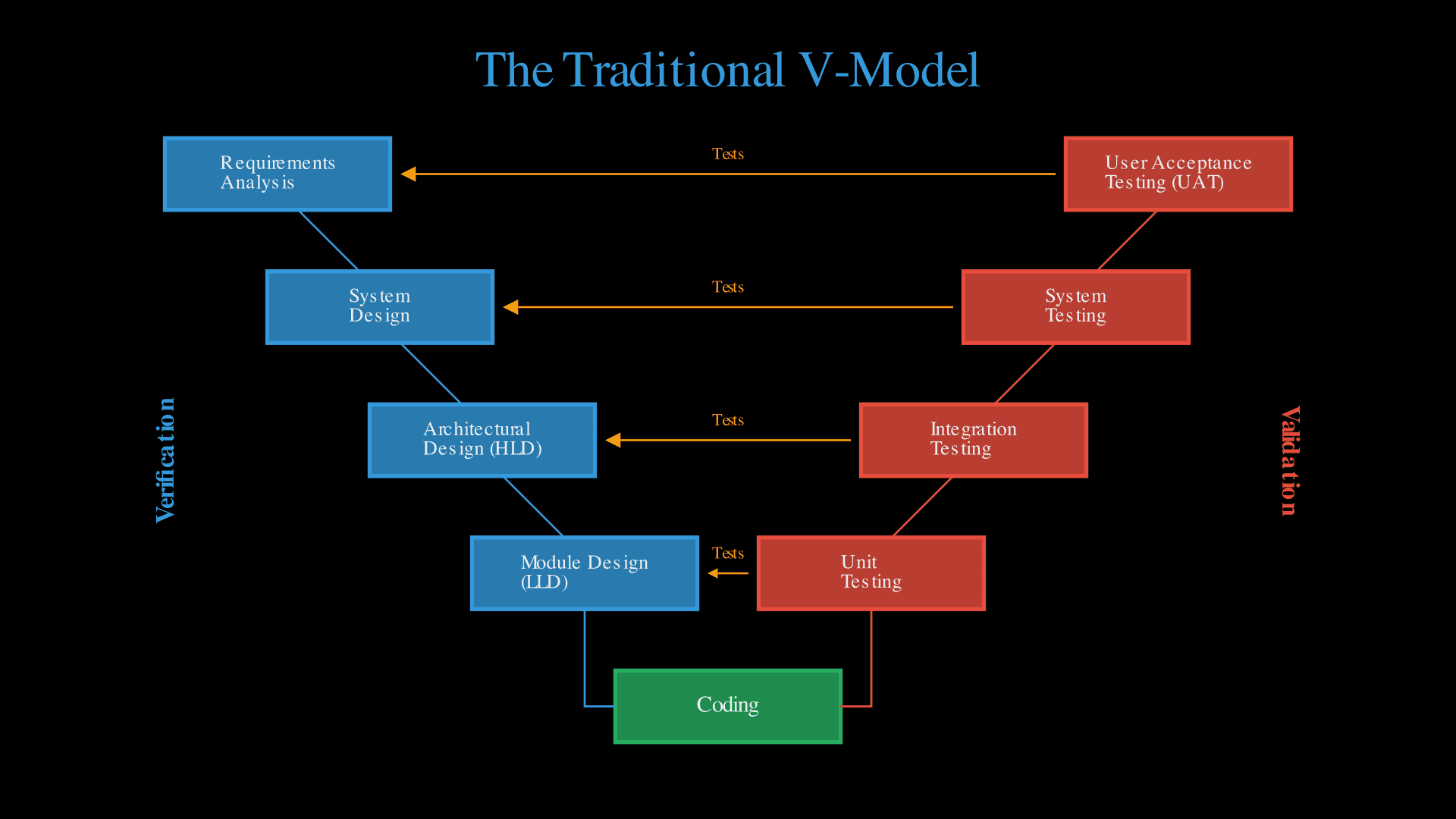
The verification stream is divided into five phases: Requirements Analysis, System Design, Architectural Design (High-Level Design), Module Design (Low-Level Design), and Coding. The validation stream connects each phase, except for the coding phase, in the verification stream to the appropriate level of tests. This means that the following phases are connected:
- User Acceptance Testing (UAT) connects to Requirements Analysis. This phase validates that the complete system meets the original business requirements and user needs.
- System Testing connects to System Design. This phase verifies that the entire integrated system functions correctly according to the system architecture specifications.
- Integration Testing connects to Architectural Design (HLD). This tests that the individual modules communicate and work together as designed.
- Unit Testing connects to Module Design (LLD). This ensures that each individual module functions correctly according to its detailed specifications.
Creating a full V-Model as a preparation before a greenfield application has several benefits. First, instead of immediately jumping into implementation you will be forced to think through what the problem space is, what the requirements are, and what the architecture is. Second, you engineer context in such a way that the coding agent has understanding on several different levels: It has access to the user's intent via the requirements analysis phase, technical requirements via the system design phase, the architecture via the HLD phase, pseudocode via the LLD phase, and specifications for tests. Third, by establishing clear traceability between requirements, design, and tests, you are context engineering in a way that reduces the likelihood of the LLM getting stuck in the aforementioned "context trap".
The downside of having a full V-model is of course that it creates a lot of overhead. Especially the testing specifications and the LLD phase will create a lot of extra work. This overhead creates a tension: LLMs can code extremely fast, but thorough V-Model documentation slows you down. This is because you must continuously verify that implementation matches specifications and update documentation whenever deviations are discovered, consistently synchronizing requirements, design, tests, and code. However, I argue that this slowdown is precisely what prevents the chaotic "big hairy messes" that result from moving too quickly without structure.
The Dynamic V-Model
How do we keep the benefits that the V-Model has for spec driven development with AI, but reduce any unnecessary overhead? We know (or assume) that LLMs are good at writing code when given precise enough instructions and sufficient context. The first aspect of the V-Model that generates overhead is writing pseudocode in the LLD phase. Instead of writing pseudocode we can use the context provided by the architecture and requirements to generate implementation plans and directly use AI coding to translate the plans. For this you need a structured prompt that transforms requirements, design, and architecture into an implementation plan. GitHub Speckit is a useful tool that has community maintained prompts to do this. With a little tweaking you can make use of these prompts. Of course, once you have an implementation plan proof reading it is always recommended. This replaces the labor-intensive task of writing pseudocode with the easier tasks of generating specs, checking them, and using coding agents to implement the code directly.
The second source of overhead is pre-specifying the tests in the validation stream. Instead we will use a test-driven development (TDD) [2] inspired approach. Starting from the requirements in your V-Model, you let the LLM brainstorm tests that validate those requirements and then implement the tests before writing any production code. A feature is not complete until all its tests pass. The refactoring phase will be discussed in a future article on workflow management. This isn't a strict application of TDD's red-green-refactor cycle; the tests originate from requirements rather than from a single unit of behavior. However, the spirit is the same: tests come first, and code is written to satisfy them. When you write these tests to be self-documenting, they double as living documentation that stays synchronized with the requirements. This forces the LLM to stick closely to the specs and saves time compared to pre-specifying every test in the validation stream upfront.
We pre-specify only the following 3 phases of the V-Model: (1) System Requirements, (2) System Design, and (3) Architecture. Acceptance tests remain tied to System Requirements and are written before implementation begins. In contrast, integration, unit and system tests, are not pre-specified. By cleverly using LLMs, generated implementation plans, and our TDD inspired approach (all forms of context engineering for coding agents) we transform the original V-Model, where every phase was pre-specified before implementation, into a dynamic V-Model. This retains the benefits and most of the structure of the original V-Model but makes implementation more efficient.
A well-informed reader may observe that pre-specifying System Requirements and System Design resembles the first phases of a waterfall model [3]. Where the dynamic V-Model differs from the waterfall model is that the waterfall model freezes requirements and architecture before any implementation. In contrast, due to the use of a TDD inspired approach in the Dynamic V-Model, our model has fast feedback loops that reveal requirement ambiguities and architectural constraints during implementation, which prompt iterative refinement. Additionally, features are delivered incrementally. Each cycle from requirements to architecture to tests to code to validation, has to be completed before proceeding to the next feature. This creates a series of micro-V patterns as opposed to one monolithic waterfall.
The Dynamic V-Model, in my experience, reduces upfront overhead compared to the original V-Model and accelerates implementation. However, expectations must be managed carefully. While upfront overhead drops and implementation accelerates, maintaining quality discipline becomes psychologically harder. TDD already requires a great amount of discipline; writing tests first and resisting the urge to just keep coding first and adding tests later. Furthermore, keeping requirements, architecture, tests, and code synchronized remains challenging.
A note on traceability: The Dynamic V-Model intentionally drops the explicit link between Low-Level Design and Unit Tests that exists in the original V-Model. In our TDD inspired approach, tests serve as executable specifications rather than separate documentation artifacts. Traceability becomes indirect: the test validates the code, the code implements the plan, the plan satisfies the requirements. This trades explicit documentation for velocity. A big caveat here is that if you work in a regulated environment that requires a full V-Model specification the dynamic V-Model will likely be insufficient.
The Jagged Frontier
If, like me, you have been experimenting with incorporating LLMs into your workflow, you have likely experienced being amazed by how well they work on one task, only to be dumbfounded by them confidently producing incorrect results on the next task. Did the model spontaneously forget what it had to do?
If you have experienced this, you are not the only one. In 2023 a team of researchers at Harvard Business School set out to study how LLMs affected performance of knowledge workers [4]. They ran an experiment with 758 management consultants from the Boston Consulting Group. A randomly assigned group of the consultants was given access to an LLM (GPT-4) on 18 tasks that were representative of real consultancy work. They gave this inconsistency a name: "The Jagged Technological Frontier". For tasks that were within the frontier the users completed 12.2% more tasks, with a 25.1% speed-up, and quality improvements of 40%. If however a task was outside of the frontier users were 19 percentage points more likely to produce incorrect results than those without AI assistance. The same users, at the same company, at the same time, but with drastically different outcomes depending on the task.
The researchers also found that the consultants worked with LLMs in two distinct ways. Centaurs (inspired by Gary Kasparov's notion of computer assisted chess called Centaur Chess) divided tasks between themselves and the LLM strategically. Cyborgs integrated the AI continuously into their process, working alongside it rather than delegating to it. In practise, this would mean that you use your coding agents in an ai pair programming setup. A follow-up study by the same researchers [5] in 2025 identified a third way of working with LLMs: Self-Automators, who fully delegated tasks without engaging with the output. In later articles we will revisit these modes of working with AI and what their upsides and downsides are. For now knowing the terminology suffices; it will reappear when we discuss evaluation of LLM tools.
Applying the Jagged Frontier to Software Engineering
The study that introduced the Jagged Frontier as a concept was done on consultants at the Boston Consulting Group, not software engineers. However, the primary observation still holds; the same person with the same model can get excellent results on one task, and poor results on the next. The jagged frontier shows up in two places in software engineering. First, at the task level: some coding tasks sit very comfortably within the frontier whilst others cannot reliably solved by LLMs. Second, at the tool level: This refers to the language you write in and the framework you pick. Let's address each separately.
Mapping out where the task-level frontier actually sits has been the topic of recent research. One frontier that was explored early 2025 by the Model Evaluation & Threat Research Institute (METR) was software engineer productivity in large open-source codebases (1.1 Million lines of code, 23000 stars on average) [6]. They asked 16 contributors to provide a list of real issues, features and refactors on repositories that they had been contributing to for multiple years. Each item was assigned a category; LLM assistance allowed or LLM assistance not allowed. Contrary to the expectations of experts and developers themselves, LLM-assistance in this brown field scenario slowed down completion of each item by 19%.
The METR researchers attributed this result to five factors, two of which point directly at what LLMs cannot yet do reliably. The first is navigating large and complex codebases. Benchmarks like RepoBench [7] and SWE-bench [8] attempt to quantify this, though results are mixed. While top-performing agents can now solve over 70% of the problems in the SWE-bench Verified subset, the benchmark's reference solutions typically require editing only a small number of files (averaging 1.7 files per issue) [8]. Performance drops precipitously on more complex, "in-the-wild" tasks that require broad architectural understanding, aligning with the METR findings. Engineers reported that LLMs made some weird changes in other parts of the code that cost me time to find and remove and that one prompt failed to properly apply the edits and started editing random other parts of the file. The second is what the researchers call "implicit repository context", which is the undocumented knowledge that experienced contributors carry about the codebase. As one engineer put it: we know the data that will interact with the code, but [the model] doesn't know the data. It doesn't know we need to take care of this weird case of backwards compatibility and [thus] keep this specific line. And this is very hard to give as [context to the model]. [6]
The METR studied brown field software engineering. A study done [9] examined 865 isolated coding tasks across four widely-used benchmarks and tested six frontier LLMs on each task. They found 114 tasks that every single model consistently failed at. The failures fell into four patterns: mapping the problem to the wrong algorithm, producing an incomplete solution that misses steps, mishandling edge cases, and getting the output format wrong. Interestingly, these failures cannot be explained by code complexity alone. This points towards these failures being due to the semantic content of the problem.
The practical takeaway from both studies is the same: not every task should go to coding agents. When building your implementation plan in the Dynamic V-Model, assign each (part of) a feature to either yourself or the model based on where the frontier currently sits. These boundaries move fast, so revisit this assignment as new models are released.
From the task level we move on to another moving frontier, the language and framework level. The most straightforward (and in my experience the most used) way to evaluate what tool and framework the LLM is likely to succeed with is to look at benchmarks. Benchmarks are standardised tests that measure how well a model generates code in a given language. These benchmarks are useful directionally, but there are some important caveats. First, they consist of small, self-contained tasks that bear little resemblance to real software engineering work [6,9]. Second, benchmark answers have leaked into training data, which means that high scores may reflect memorisation rather than capability [10,11]. Third, benchmarks measure whether the model can solve a problem, not how easy it is for you to steer it towards a solution. In practice, steerability matters as much as raw capability.
A recent ICML paper [12] proposed a better approach for AI testing: "Centaur-specific evaluations" that measure human–LLM interaction metrics such as helpfulness, steerability, and error recoverability. This is the right direction, but these evaluations are expensive, slow, and have not been adopted at scale. No study to date has incorporated them systematically, which leaves a gap.
In the absence of rigorous evaluations, you are left with heuristics derived from experience. The ones I have found most reliable:
- favour languages and frameworks that have large public codebases on GitHub. The LLM has seen more of that code and will generate better output.
- Avoid anything very new or very niche, because the model's training data will be thin.
- Lean on the experience of your colleagues and community forums. Better yet, keep a shared log of what tasks the LLM handled well and where it fell short, and update it every time a new model is released.
To be very candid: this is the bleeding edge of LLM technology. Informed experimentation by trying tools, measuring results, and sharing what you learn is preferred over charisma induced certainty.
Project Configuration (The "Setup")
We know what to build (Dynamic V-Model) and where the LLM will struggle (Jagged Frontier), let's turn our attention to setting up the project itself. We start off by simply setting up your folder structure. Next, we will discuss how to encourage your agent to stick to engineering best practices via context management. We will close by discussing how to set up your requirements and documentation.
Folder Structure
In the previous sections we've built the foundation, now we are putting up the framing of the building. To keep it as brief as possible, here is the folder structure:
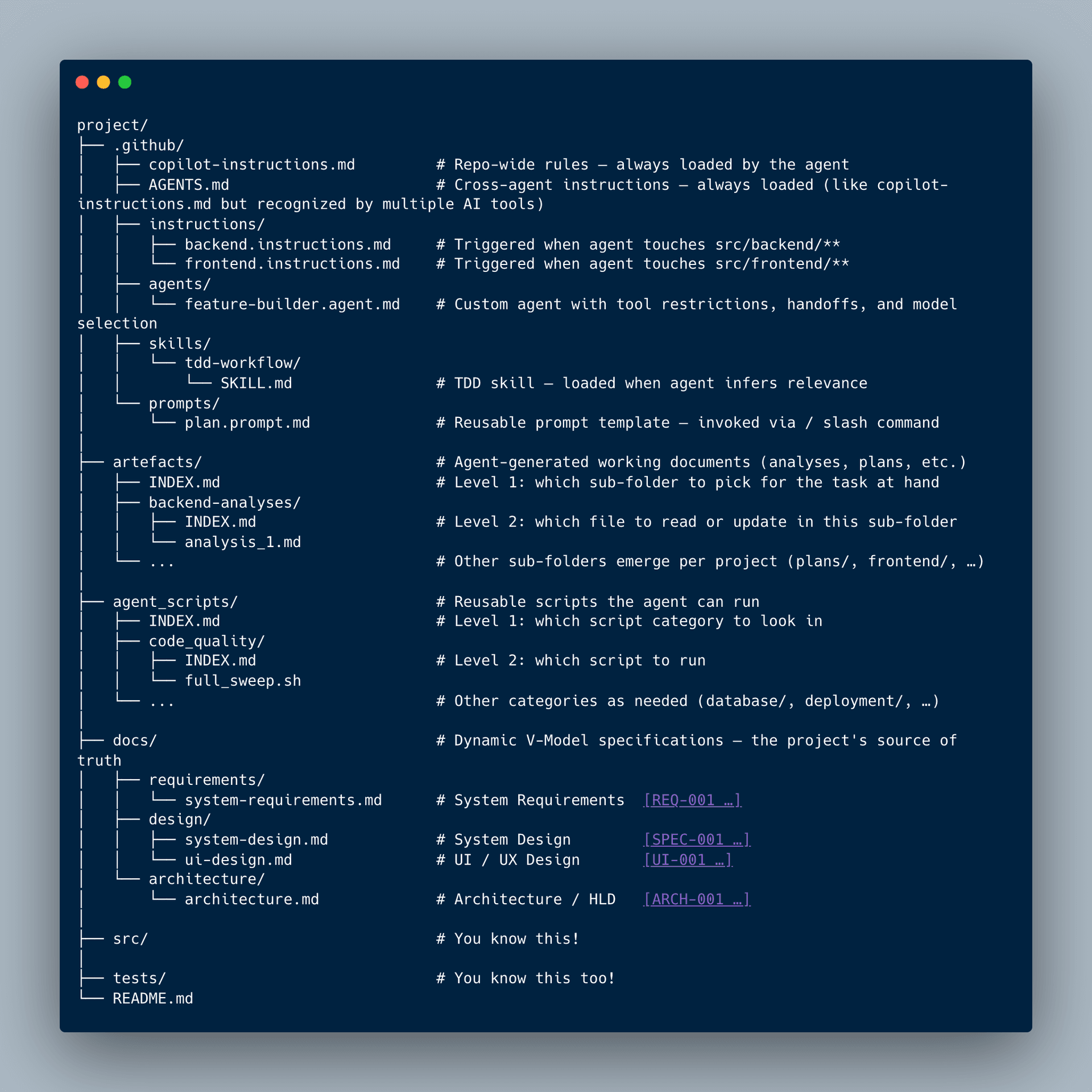
Now that the overwhelming part is out of the way, let's dive into the motivation behind each folder in the structure.
- /.github: This is where you teach your coding agents the rules that it must follow in order to work on your project. The purpose of the files in this folder will be unpacked in the next section.
- /artefacts: A home for documents the agent generates during work; analyses, implementation plans, feasibility studies etc. The INDEX.md files act as a table of contents: the root INDEX tells the agent which sub-folder to look in, and each sub-folder's INDEX lists the files inside it. This two-level navigation prevents the agent from wasting tokens scanning directories.
- /agent_scripts: Scripts that the agent will need to run more than once. Think linting sweeps, database cleanup, deployment checks. Same INDEX pattern as artefacts: category-level navigation, then script-level navigation.
- /docs: The source of truth for your Dynamic V-Model. Requirements, system design, UI design, and architecture each get their own file with a consistent tagging convention ([REQ-001], [SPEC-001], etc.). The agent works FROM these documents, so their quality directly determines the quality of the code it produces.
- /src: Your application code, split by concern.
- /tests: Unit, integration, and end-to-end tests. The exact sub-structure depends on your project and framework. What matters is that it exists from day one. You can't do TDD if you don't have anywhere to place your tests
Setting up the Agent to succeed
When I first started building larger software projects with LLM agents my assumption was that they would automatically stick to best practices. I've already told you that my first attempts at vibe coding ended in hairy messes. Let me tell you a bit more about my first "hairy mess" which was manifested during a 3-hour company hackathon. The idea was to quickly create a simple MCP server that connected some important documents to our coding environment. So my team and I started hacking away at the problem, instructing the coding agents to build what we wanted to have. After a hilariously chaotic process of vibe coding (during which our agent once deleted the entire folder), we ended up with barely functional code. This code also mysteriously stopped functioning the day after we demo-ed it.
Fortunately, we quickly figured out that you could provide context to your agent which would prompt it to do better. As time progressed, I developed my own processes and tools. Additionally, the tooling from VSCode and other providers also got better. In this section, I will outline how I used to provide instructions and how I would do it now given more recent tooling.
My first improvement was to engineer context in a way that most developers are already familiar with, via the copilot-instructions.md (or AGENTS.md, which is the cross-tool compatible and serves the same purpose) file in the .github folder. This was an excellent place to provide generic repo-wide instructions. A further refinement was the fact that you could put AGENTS.md in any sub-folder, the closest AGENTS.md would "win". The benefit that AGENTS.md provides is that these instructions are always loaded. This strong point is also its weak point. The tokens in these files are always consumed, irrespective of whether your task needs them or not. Say you are writing documentation, your agent will be reminded of your TDD workflow, clean architecture, PEP-8 and all the other best practices that you need for your entire project.
My solution was to create a task-instruction table in INDEX.md. This was a separate reference file I could load only when needed. The table mapped each type of task to the documents the agent should read. An example can be seen below.
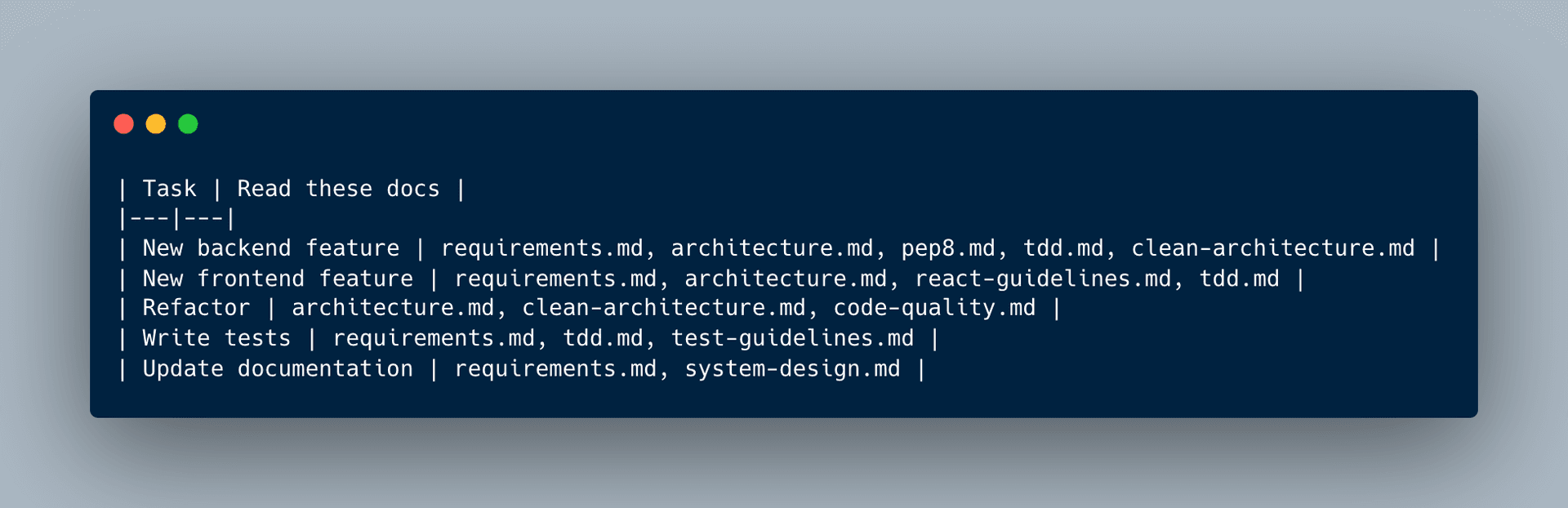
When starting a task, I'd manually add INDEX.md to the VS Code prompt, describe what I was doing, and the agent would parse the table to figure out which docs to load. Once the table was in context, the routing was automatic. Which meant I didn't have to list each guideline file. However, I had to remember to reference INDEX.md each time.
The tooling has since caught up. You can set them up such that they will automatically load files based on file patterns or semantic matching. The *.instructions.md files are stored in the .github/instructions folder and allow you to pattern match to what files the instructions should be applied, or to simply always apply them. For example:
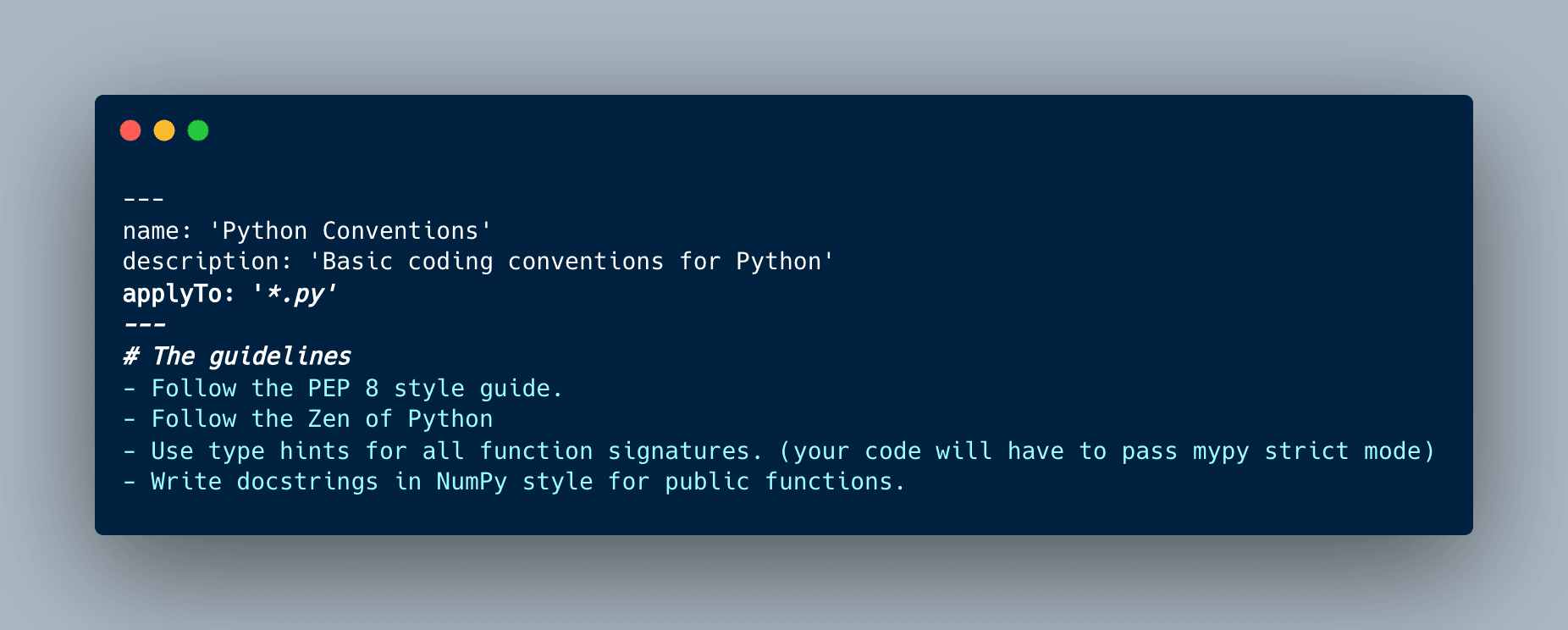
The .instructions.md files are loaded automatically based on which files you're editing (via glob patterns like *.py). For task-based routing, loading different context depending on what you're doing rather than which files you're touching, you need agent skills.
Agent skills let you define specialized capabilities that load on-demand based on the task that you assign to the coding agents. The agent reads skill metadata and decides when to invoke them, or you can call them manually with slash commands. Here's an example skill for the "Refactor" task from the table above:
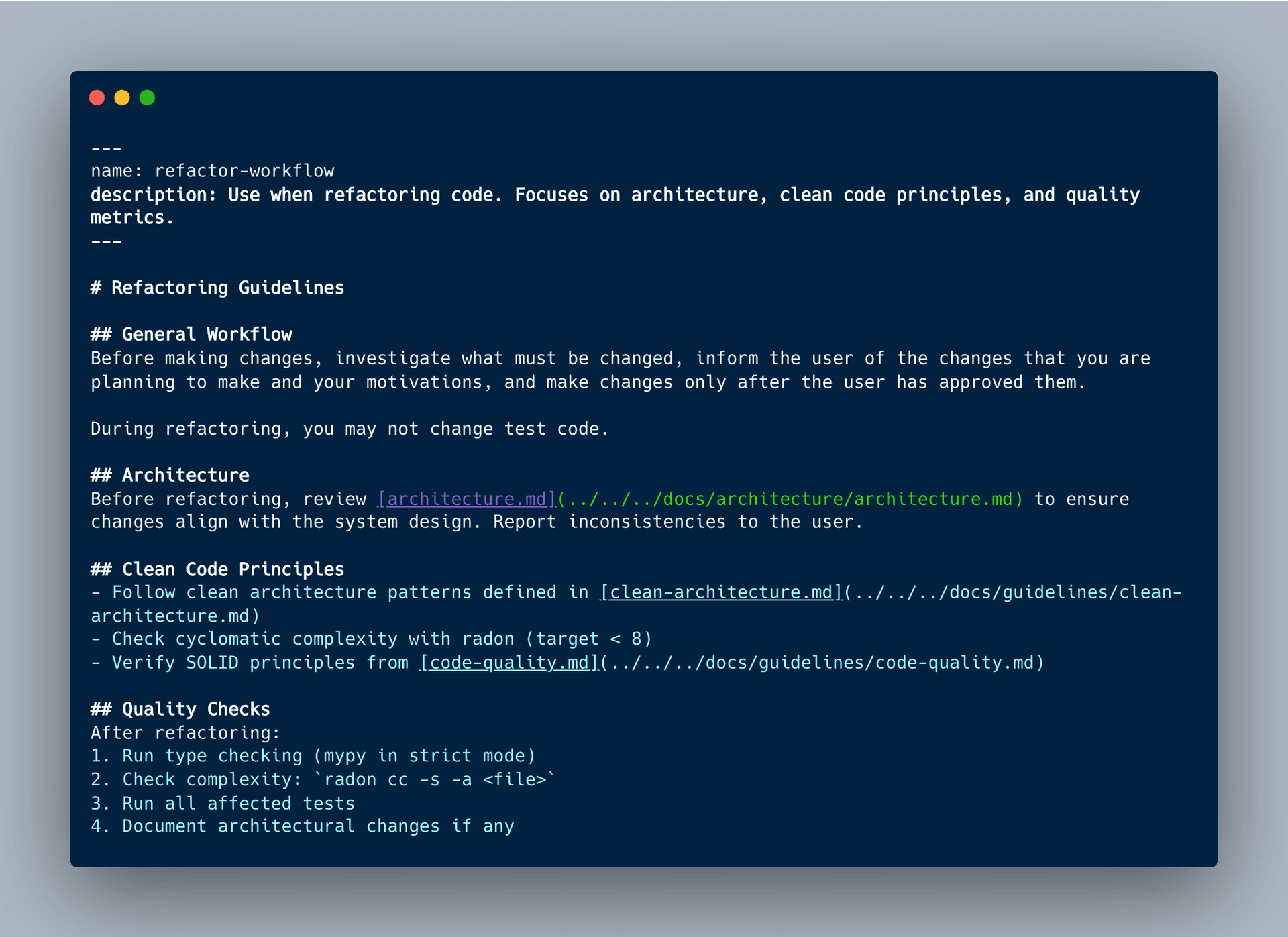
Setting up these customization options improve the quality of the resulting project and thus doing so before you start programming is very valuable. They do however have their limitations: A recent post by Vercel tested whether agents reliably retrieved documentation via skills when working with Next.js 16 APIs that were released after the LLM was trained. The results were sobering: with default behavior, skills were never invoked in 56% of eval cases, and the pass rate of the tests (53%) was identical to having no documentation at all. Even after adding explicit instructions in AGENTS.md telling the agent to use the skill, the pass rate only reached 79%. What did achieve a 100% pass rate was embedding a compressed documentation index directly in AGENTS.md as passive context, removing the agent's decision of whether to retrieve documentation entirely. These results are limited to a single framework (Next.js) and a controlled eval suite, not a real-world project, so they should be taken as directional rather than definitive. The results point to passive context that is always available outperforming on-demand retrieval that depends on the agent recognizing it needs extra information.
However, the Vercel experiment compressed a single framework's documentation into 8KB. In a real project, your engineering context is much larger: architecture documents, coding standards, workflows, requirements, and task-specific guidelines can easily run to tens of thousands of tokens. Embedding all of that in AGENTS.md would mean every interaction, whether you are writing a docstring or refactoring a module, consumes the same bloated context. Hence, manual management of context has been made more convenient, but it has likely not been automated away yet by agent skills.
To summarize: we started with the problem that agents ignore engineering best practices unless explicitly told about them. The first solution was a manual lookup table (INDEX.md) that mapped tasks to the relevant guideline documents. The tooling has since provided more convenient mechanisms: always-on context via copilot-instructions.md and AGENTS.md, file-based routing via .instructions.md, and task-based routing via agent skills. However, early evidence suggests that on-demand retrieval is not yet reliable enough to fully replace manual context management. In total there are seven customization options available in VSCode; this section covered the ones most relevant to enforcing engineering discipline, while others such as Custom Agents, Prompt Files, Hooks, and MCP servers serve different purposes and will appear in later articles.
The primary takeaway is this: by providing guidelines as guardrails to your agent before you start coding, you aim to reduce the variance of the LLMs output which increases the likelihood that you end up close to where you want to be at the conclusion of your project. We will discuss the specific documents that I like to use in future articles.
Requirements Documentation & Traceability
Earlier in the article we've introduced the Dynamic V-Model. We've stripped the original bulky V-Model for parts and made it useful for rapid iteration, traceability and LLM context management. The dynamic V-Model was our single source of truth, to make it work we had to specify three documents: System Requirements, System Design, and Architecture. In this section, I will guide you through setting it up, starting with setting up your folder structure.
Documentation Structure
Your docs folder should mirror the three phases you're pre-specifying:
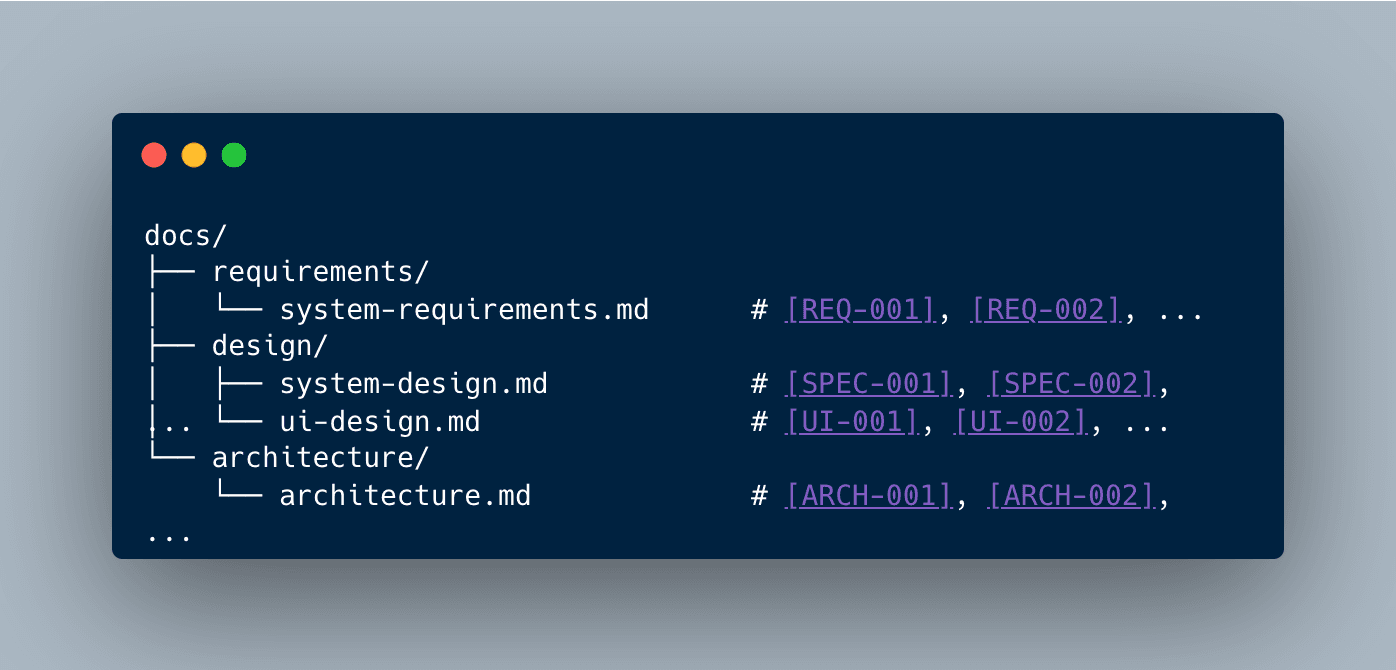
The tagging convention ([REQ-001], [SPEC-001], [ARCH-001]) creates a simple traceability system. When you write an architecture decision, you can reference which requirements it satisfies: "This module structure satisfies [REQ-003] and [REQ-007]." When the LLM implements code, it can trace back to the original requirement. When a test fails, you know which specification it validates.
Using Markdown Files
If you want to get started as quickly as possible, the easiest solution is to use simple markdown files. All you need to do is start writing and ensure that the structure you give within your markdown documents is applied consistently.
Though this approach is fast, it does have limitations. First, its very easy to make mistakes. Your entire traceability will have to be done manually without any way to check. Additionally, when you delete a requirement there is no tool that will automatically warn you that other specs and tests are still referencing it. Second, you cannot compile this documentation into something that can be easily read. For small projects, this is not much of a problem, but as you gather more requirements you will start missing that as a feature.
If you want to quickly create a small project (or test out the dynamic V-Model idea), the manual overhead that markdown introduces is manageable. You're already been reviewing your own docs and catching a broken reference is just one more thing to check. However, if you have more sophisticated projects with multiple stakeholders, you need something more heavyweight.
Using Sphinx-Needs
When projects grow past a certain size the manual approach breaks down. Sphinx-Needs is a documentation tool that makes traceability explicit and machine-verifiable.
Instead of markdown, you write reStructuredText (RST) with special directives:
.. req:: User Authentication
   :id: REQ-001
   :status: approved

   The system shall verify user identity.

.. spec:: Authentication Timeout
   :id: SPEC-001
   :satisfies: REQ-001

   The identity verification shall timeout after 30 seconds of no input.
The :satisfies: link creates a verifiable connection. Sphinx-Needs can generate traceability matrices, warn about orphaned requirements, and produce documentation that your stakeholders will actually be happy with.
The downside is that RST syntax is less intuitive than markdown, and configuring Sphinx takes time. However, LLMs are excellent at syntax translation and in my opinion Sphinx lies very much within the Jagged Frontier. My personal workflow: write requirements in plain language, then instruct the llm agent to translate my requirements to RST, review the output and make some edits and build the documentation.
On Speckit
GitHub Speckit provides a structured workflow for translating requirements into implementation plans. The workflow is driven by seven slash commands:
- /constitution — Define non-negotiable project rules (tech stack, patterns, constraints)
- /specify — Describe what you're building (features, pages, user flows)
- /clarify — Resolve ambiguities in the specification (optional)
- /plan — Generate architecture, components, and dependencies
- /tasks — Break the plan into executable work items
- /analyze — Validate consistency before implementation (optional)
- /implement — Generate code from the tasks
Speckit doesn't natively integrate with your Dynamic V-Model docs. Out of the box, it expects requirements as inline text. The key adaptation is in the /tasks step: instruct the LLM to read your docs/ folder, reference your architecture constraints, and trace each task back to higher-level requirements ([REQ-xxx], [SPEC-xxx]). This creates the traceability link between generated tasks and your Dynamic V-Model artifacts.
Store the generated plans in artefacts/plans/. These become the input for your TDD cycle. Once you understand Speckit's prompt structure, you can write your own custom version that integrates more tightly with your docs.
Conclusion
LLM-assisted development is not magic. Because it takes software engineering, which is very deterministic to a more stochastic process, it can sure feel like voodoo. The principles in this article are variance-reduction techniques: structure your requirements hierarchically via spec driven development (Dynamic V-Model) so the LLM has elaborate and unambiguous navigable context, evaluate where the model will struggle before assigning tasks and selecting tools (Jagged Frontier), and teach the agent your engineering principles through explicit documentation (folder structure, instructions, skills). None of this guarantees success, but it shifts the odds. The vibe coding problems I described in the introduction weren't caused by bad models. They were caused by insufficient accessible structure and vagueness. Give your agent the context it needs, such that complexity stays manageable and the likelihood of project success goes up.
Try It on Your Next Project
Before you start your next AI-assisted project, try this:
- Write three documents before writing any code: System Requirements, System Design, and Architecture. Even rough versions will outperform no documentation at all. Iteratively refine using your coding agents to keep your life simple.
- Tag everything. Use
[REQ-001],[SPEC-001],[ARCH-001]so both you and the agent can trace decisions back to their source. - Ask yourself the Jagged Frontier question for every feature: "Can the LLM handle this ai coding task reliably, or should I write this myself?" Be honest. Assign accordingly.
If you try the Dynamic V-Model on a real project, I'd like to hear how it went. You can reach me via the contact form on my personal website. In Part 2, we'll cover the workflow: how TDD, SOLID, and disciplined iteration keep the agent productive once you've started coding.
Citations
[1] V-Model. [Online]. Available: https://en.wikipedia.org/wiki/V-model
[2] Test Driven Development. [Online]. Available: https://en.wikipedia.org/wiki/Test-driven_development
[3] Waterfall model. [Online]. Available: https://en.wikipedia.org/wiki/Waterfall_model
[4] F. Dell'Acqua et al., "Navigating the Jagged Technological Frontier: Field Experimental Evidence of the Effects of AI on Knowledge Worker Productivity and Quality," Harvard Business School, Boston, MA, USA, Working Paper 24-013, 2023. [Online]. Available: https://www.hbs.edu/ris/Publication%20Files/24-013_d9b45b68-9e74-42d6-a1c6-c72fb70c7282.pdf
[5] S. Randazzo et al., "Cyborgs, Centaurs and Self-Automators: The Three Modes of Human-GenAI Knowledge Work and Their Implications for Skilling and the Future of Expertise," SSRN Electron. J., 2025. [Online]. Available: https://ssrn.com/abstract=4921696
[6] T. Kwa et al., "Measuring the Impact of Early-2025 AI on Experienced Open-Source Developer Productivity," METR, Tech. Rep., Jul. 2025. [Online]. Available: https://arxiv.org/abs/2507.09089
[7] T. Liu, Y. Xu, and Y. Wang, "RepoBench: Benchmarking Repository-Level Code Auto-Completion Systems," arXiv preprint arXiv:2306.03091, 2023.
[8] C. E. Jimenez et al., "SWE-bench: Can Language Models Resolve Real-World GitHub Issues?," in Proc. ICLR, 2024. [Online]. Available: https://openreview.net/forum?id=VTF8yNQM66
[9] A. M. Sharifloo et al., "Where Do LLMs Still Struggle? An In-Depth Analysis of Code Generation Benchmarks," arXiv preprint arXiv:2511.04355, 2025.
[10] M. Riddell, A. Ni, and A. Cohan, "Quantifying Contamination in Evaluating Code Generation Capabilities of Language Models," in Proc. ACL, 2024.
[11] N. Jain et al., "LiveCodeBench: Holistic and Contamination Free Evaluation of Large Language Models for Code," arXiv preprint arXiv:2403.07974, 2024.
[12] A. Haupt and E. Brynjolfsson, "Position: AI Should Not Be An Imitation Game: Centaur Evaluations," in Proc. ICML, 2025. [Online]. Available: https://openreview.net/forum?id=LkdH35003E